← All WonderLister user guides
Where an invoice template is written — the invoice your buyers get. It works exactly like the description template editor: HTML, plus tags that are replaced with the real order details when the invoice is produced.
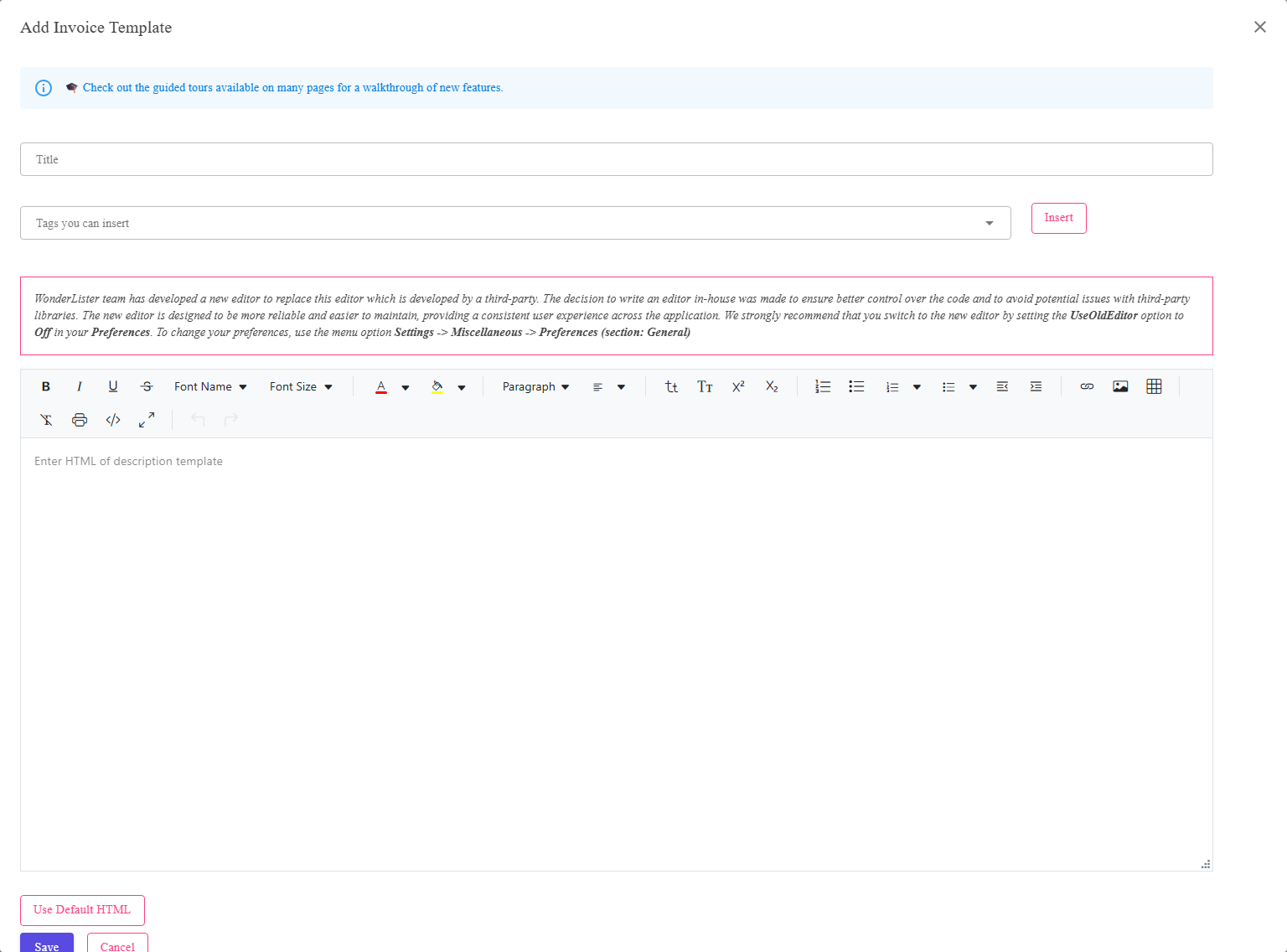
Where to find it
- Click Settings in the bar on the left.
- Under Descriptions and invoices, click Invoice Templates.
- Click Add for a new template — the Add Invoice Template dialog opens — or select a template and click Edit for the Edit Invoice Template dialog.
What is in the editor
| Control | What it does |
|---|---|
| Title | What the template is called. |
| Use this template for invoices | Switch it on to have your invoices made from this template. Only one template can be on at a time: switching it on here turns it off on the others. |
| Tags you can insert | The tags available — the order number, the buyer, the lines, the totals. Managed on Invoice Template Tags. |
| Insert | Puts the chosen tag in at the cursor. |
| Use Default HTML | Replaces what is in the box with WonderLister’s own ready-made invoice. The quickest way to start — and the way back if an edit has gone wrong. |
| The HTML box | The invoice itself. |
| Save | Stores the template. |
| Cancel | Closes without saving. |
How to build one
- Type a Title for the template.
- Click Use Default HTML to start from a working invoice.
- Change the parts that are yours — the heading, your address, your payment terms.
- Insert tags where the order’s own details belong: pick one in Tags you can insert and click Insert.
- Switch on Use this template for invoices if this is the one your invoices should use.
- Click Save, then check it with Preview on the Invoice Templates page.
Saving without a title shows Title must be entered; saving with the editor empty shows HTML must be entered.
Where invoices are produced
From the Orders page: select the orders, click More on the toolbar, then under Order click Invoices.
FAQ
How do I start over if I have made a mess of the HTML?
Use Default HTML puts the standard invoice back, and you can start again.
Why is my invoice missing the order total?
A total appears because a tag puts it there. Insert the tag for it.
Which template do my invoices use?
The one with Use this template for invoices switched on. If none is, the first of your templates by title, and if you have none, WonderLister’s standard invoice. The Used for invoices column on the Invoice Templates page shows which one is switched on.
Can I have different invoices for different accounts?
Not at the same time. You can keep as many templates as you like, but invoices are made from one of them. To use another, switch Use this template for invoices on for it before you produce the invoices.
Is this the invoice eBay sends?
No. eBay has its own. This one is produced by WonderLister from the Orders page.
Support
For further assistance you can:
- Email support@wonderlister.com
- Use the Contact Us page inside the application
← Back to the User Guide index
Or go to Support, the FAQs, or contact us.