
← All WonderLister user guides
Brings down the Best Offers buyers have made on your listings, so you can see what has been offered without
going to eBay for each one.
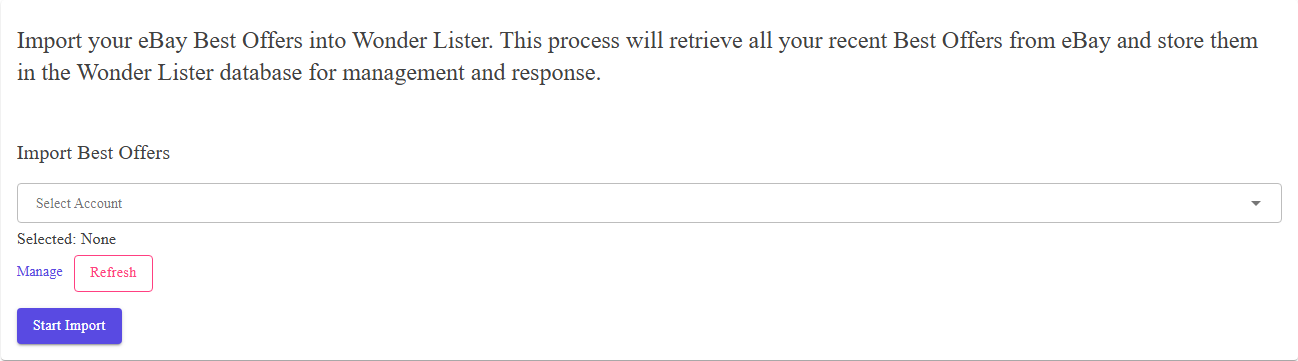
Where to find it
Open eBay Sync from the application bar and choose
Import Best Offers.
The controls
| Control | What it does |
|---|---|
| Start Import | Queues the import. There is no date range — offers are short-lived, so it fetches the current ones. |
import shows you what was outstanding when it ran, so it is worth running before you sit down to work through
offers rather than reading yesterday’s list.
Where the offers appear
Select a listing on Listings and use Show Best Offers on the
toolbar.
How an import runs
Pressing Start Import queues the work and gives you the application back. eBay returns large
results a page at a time, and each page is recorded — so
Activity Logs shows how far it has got, not just whether it finished. You are
e-mailed when it completes, unless you have turned those e-mails off in
Preferences.
FAQ
them.
enabled. That is set on the listing — and the whole feature can be hidden from the editor by
Hide Best Offer in Preferences.
Support
For further assistance you can:
- Email [email protected]
- Use the Contact Us page inside the application
← Back to the User Guide index
Or go to Support, the FAQs, or contact us.