
← All WonderLister user guides
Two settings, and both of them decide whether a spreadsheet update is allowed to delete
something. They are the most consequential settings in WonderLister, so this page is worth reading before
your first CSV update rather than after it.
Where to find it
The second section of the Customize Views dialog, and the
Update using CSV section of Preferences. They are the same
settings.
What the settings are about
A WonderLister CSV can describe more than one kind of row, told apart by a RowType column:
| RowType | What the row is |
|---|---|
M, or no RowType column at all |
The listing itself — title, price, quantity and the rest. |
C |
One compatibility — a vehicle or part fitment. |
V |
One variation — a size, a colour, and its own price and quantity. |
An update normally takes the file as the complete truth about a listing. So a file with main rows and no
compatibility rows is read as this listing has no compatibilities — and the ones it has are removed.
These two switches are how you say that the file is only about the main rows.
The settings
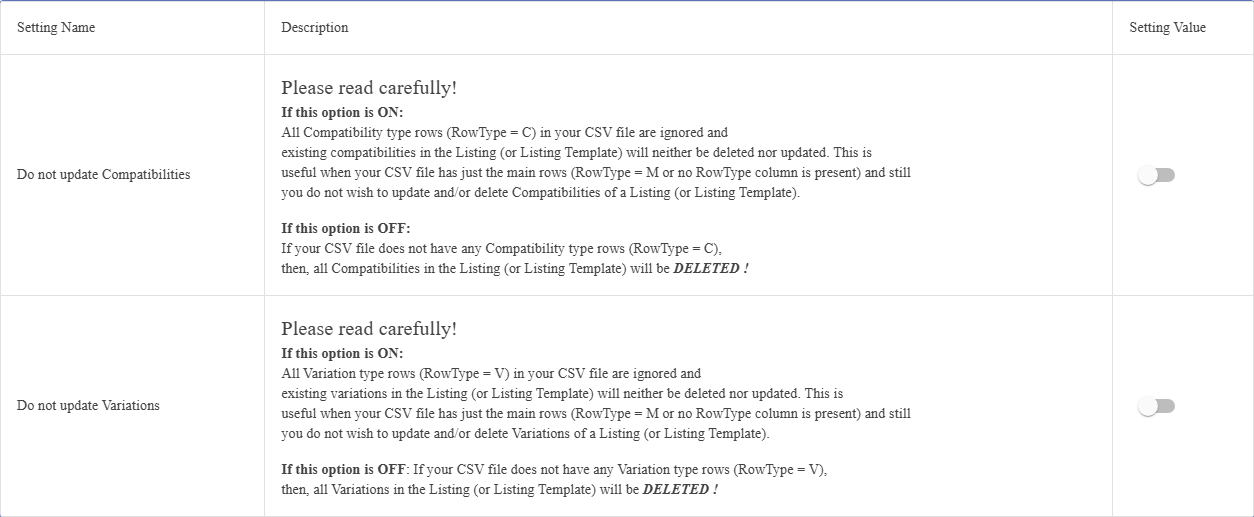
| Setting | On | Off (the default) |
|---|---|---|
| Do not update Compatibilities | Compatibility rows (RowType = C) in the file are ignored, and the compatibilities alreadyon the listing are left exactly as they are — neither changed nor removed. |
The file decides. If it has no compatibility rows, every compatibility on the listing is deleted. |
| Do not update Variations | Variation rows (RowType = V) are ignored, and the listing’s variations are left exactlyas they are. |
The file decides. If it has no variation rows, every variation on the listing is deleted. |
the price column in a spreadsheet, and updating from the result is an ordinary thing to do — and if your
export left compatibilities or variations out, that file is now a file with no
C orV rows. With these switches off, the update will strip them from every listing it touches. Turnboth on when your file is only about the main rows.
Which way round should they be?
| What you are doing | Setting |
|---|---|
| Editing prices, quantities, titles or SKUs in a file that has only main rows | Turn both on. Nothing you did not intend to touch will change. |
| Replacing a listing’s compatibilities or variations wholesale from a full file | Turn the relevant one off, so the file is treated as the whole truth. |
| Not sure what is in the file | Turn both on, and update a single listing first to see what happens. |
FAQ
Do not update Compatibilities on before the next one, and contact support about the
listings already affected.
V rows wereignored. Turn it off for that update.
RowType wereM. That is the case these switches exist for.Export to CSV.
how your file and these settings combine.
Support
For further assistance you can:
- Email [email protected]
- Use the Contact Us page inside the application
← Back to the User Guide index
Or go to Support, the FAQs, or contact us.