
← All WonderLister user guides
Three settings governing what reaches eBay when you save an active listing: whether it is sent at all, and
whether price and quantity travel with it. They exist for sellers who let another tool own part of the
listing — a repricer, or an inventory system.
Where to find it
The fourth section of the Customize Views dialog, and the
Listing Submissions section of Preferences. They are the
same settings.
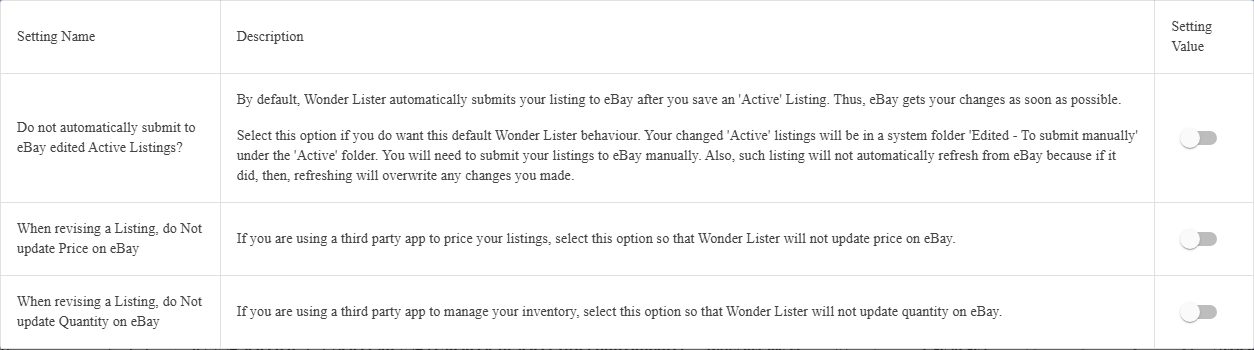
The settings
| Setting | What it does |
|---|---|
| Do not automatically submit to eBay edited Active Listings? | Normally, saving an Active listing sends it to eBay straight away, so eBay has your change as soon as possible. Turn this on and the change is held for you to submit by hand. |
| When revising a Listing, do Not update Price on eBay | Leaves price out of a revision. For sellers whose prices are set by another application. |
| When revising a Listing, do Not update Quantity on eBay | Leaves quantity out of a revision. For sellers whose stock is managed elsewhere. |
edited active listing goes into the system folder Edited – To submit manually, under
Active — that is where you find the work waiting for you. And such a listing will
not be refreshed from eBay while it waits, because a refresh would overwrite the change you have not
sent yet.
Working with manual submission
- Edit and save the active listing as usual.
- Open the Edited – To submit manually folder under Active in the folder tree.
- Select what you want to send and use Submit from the
toolbar.
Anything left in that folder is a change eBay has not been told about, and is not being refreshed. It is
worth emptying regularly.
Leaving price or quantity out
These two are narrower: the listing is still submitted, but the revision omits that one field, so whatever
the other application last set on eBay stands. Turn them on only if something else really is authoritative
for that field — otherwise WonderLister and eBay will disagree with no way to reconcile them from here.
FAQ
waiting in Edited – To submit manually and has to be submitted by hand.
would overwrite your change. Submit it, and refreshing resumes.
using a third-party repricer; turn it off if nothing else is setting your prices.
Active. It is a system folder — WonderLister maintains it, and you cannot delete or rename it.
listing is submitted when you choose to submit it.
Support
For further assistance you can:
- Email [email protected]
- Use the Contact Us page inside the application
← Back to the User Guide index
Or go to Support, the FAQs, or contact us.