← All WonderLister user guides
Leaves feedback for the buyer on an order, and sends it to eBay.
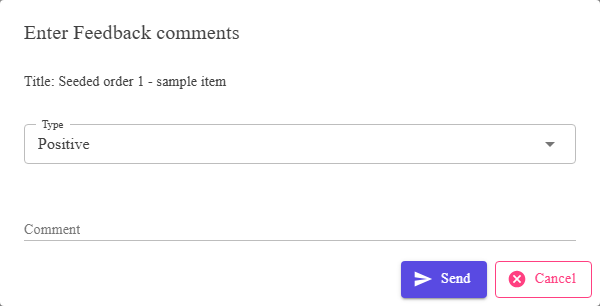
The item’s title, the feedback Type (here Positive), the Comment box, and Send and Cancel.
Where to find it
- Click Orders in the bar on the left. The Orders page opens.
- Tick the box beside the order.
- On the toolbar, click More, then under Order click Leave feedback. The Enter Feedback comments dialog opens.
What it asks
| Field | What it is |
|---|---|
| Title | The item sold, shown so you know which order you are commenting on. |
| Type | Positive, Neutral or Negative. |
| Comment | The text the buyer and everyone else will see. |
| Send | Leaves the feedback on eBay. |
| Cancel | Closes without leaving anything. |
How to use it
- Pick Positive in Type.
- Type your comment in Comment.
- Click Send.
Leaving the type empty shows Please select comment type; leaving the comment empty shows Comment must be entered.
Feedback is public and eBay does not let you take it back. Read the comment before you send it. In practice eBay only allows sellers to leave positive feedback for buyers; the other two types are offered because eBay’s own interface accepts them.
FAQ
Can I change feedback I have left?
No. It is sent to eBay and eBay owns it from then on.
Can I leave feedback on several orders at once?
Select them before opening the dialog — bearing in mind they will all carry the same comment.
Why did eBay refuse the feedback?
eBay has its own rules about when feedback may be left — usually a time limit, or feedback already left for that order. Open the run in Activity log for what eBay said.
How do I read the feedback buyers have left me?
Through Bring in from eBay, which refreshes feedback received and feedback left.
Support
For further assistance you can:
- Email support@wonderlister.com
- Use the Contact Us page inside the application
← Back to the User Guide index
Or go to Support, the FAQs, or contact us.