
← All WonderLister user guides
Brings your listings down from eBay. It runs by itself when you first link an eBay account; this is how you
run it again — after adding a marketplace, or when something on eBay is not in WonderLister.
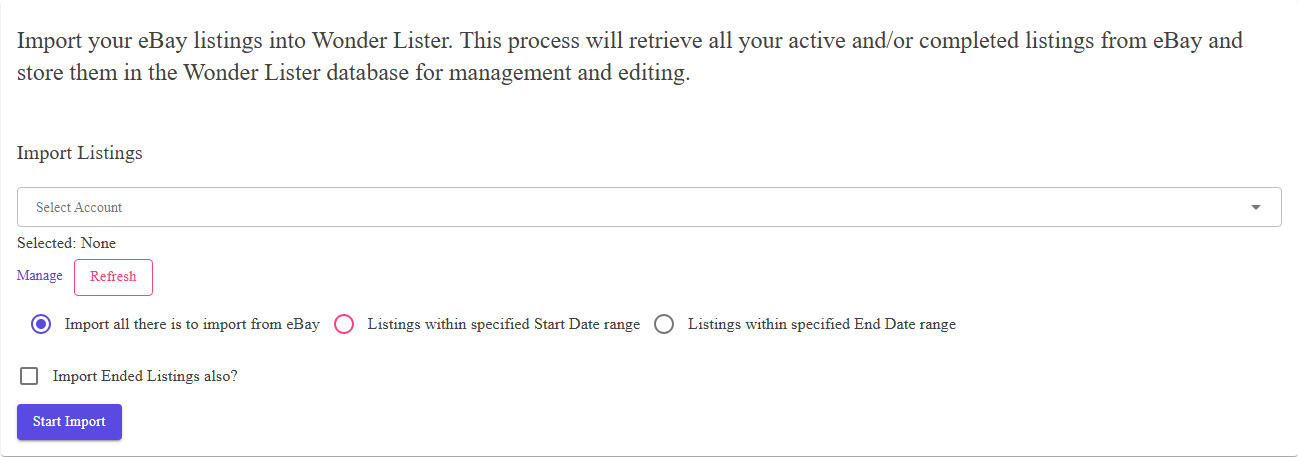
Where to find it
Open eBay Sync from the application bar and choose
Import Listings.
The controls
| Control | What it does |
|---|---|
| Select start and end dates | Limits the import to listings in that range. Leave it empty to let eBay decide the range, which is what you want for a first import. |
| Clear | Empties the date range. |
| Start Import | Queues the import. |
| Cancel | Stops an import that is running. |
eBay Sites for the accounts linked on
Manage eBay Accounts. A listing on a site you never ticked will not
come across, however many times you run this.
When to use a date range
| Situation | Dates |
|---|---|
| First import after linking an account | Leave empty — you want everything. |
| A handful of recent listings are missing | Narrow it to the days involved. Much faster. |
| Repairing an old part of your history | Set the range around it, rather than re-importing everything. |
How an import runs
Pressing Start Import queues the work and gives you the application back. eBay returns large
results a page at a time, and each page is recorded — so
Activity Logs shows how far it has got, not just whether it finished. You are
e-mailed when it completes, unless you have turned those e-mails off in
Preferences.
FAQ
account is linked. Then run the import for a date range around when the listing was created.
submitted is deliberately held back from refreshes — see
Listing Submissions.
Logs shows which page of the results it has reached.
is already there.
Support
For further assistance you can:
- Email [email protected]
- Use the Contact Us page inside the application
← Back to the User Guide index
Or go to Support, the FAQs, or contact us.