
← All WonderLister user guides
Sets the eBay account and marketplace the grid is working with. If you sell from one account on one site
this dialog rarely matters; if you have several, it is how you say which one you mean.
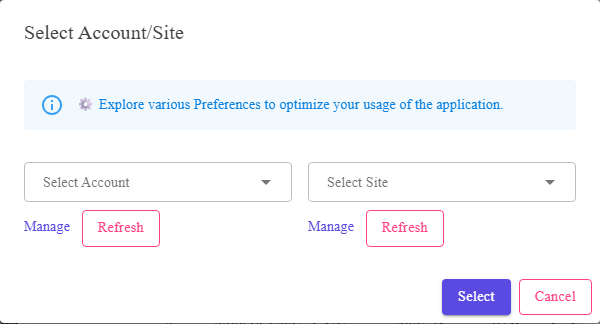
Two pickers — the account and the site — with Select and Cancel.
Where to find it
Select default account/site on the toolbar of Listings,
Listing Templates or Sales.
What is in the dialog
| Control | What it does |
|---|---|
| Select Account | Which linked eBay account. Leaving it empty means all accounts. Accounts are linked on Manage eBay Accounts. |
| Select Site | Which marketplace. Leaving it empty means all sites. The sites offered are the ones you configured on eBay Sites. |
| Select | Applies the pair. |
| Cancel | Closes without changing it. |
Empty means “all”, not “none”. Either picker can be left blank, and blank is a real answer
— it says do not narrow by that. Clearing both puts the grid back to showing everything.
— it says do not narrow by that. Clearing both puts the grid back to showing everything.
What the choice affects
- New listings. A listing created from the grid starts out on the account and site set
here, which saves setting them in the editor’s Account & Site
section every time. - Searching. The Site / account option on the
simple search bar restricts a search to this pair. - Categories and policies. Both are per site, so the site set here decides which category
tree and which business policies you are offered.
FAQ
Q: The account picker is empty.
A: No eBay account is linked yet. Link one on
Manage eBay Accounts.
Manage eBay Accounts.
Q: A site I sell on is not offered.
A: Only sites you have configured appear. Tick it on eBay
Sites and save.
Sites and save.
Q: My grid is showing fewer listings than I expect.
A: An account or site may still be set from earlier. Open this dialog and clear both
pickers.
pickers.
Q: Does this change anything on eBay?
A: No. It only says which account and site WonderLister should work with.
Support
For further assistance you can:
- Email [email protected]
- Use the Contact Us page inside the application
← Back to the User Guide index
Or go to Support, the FAQs, or contact us.