
← All WonderLister user guides
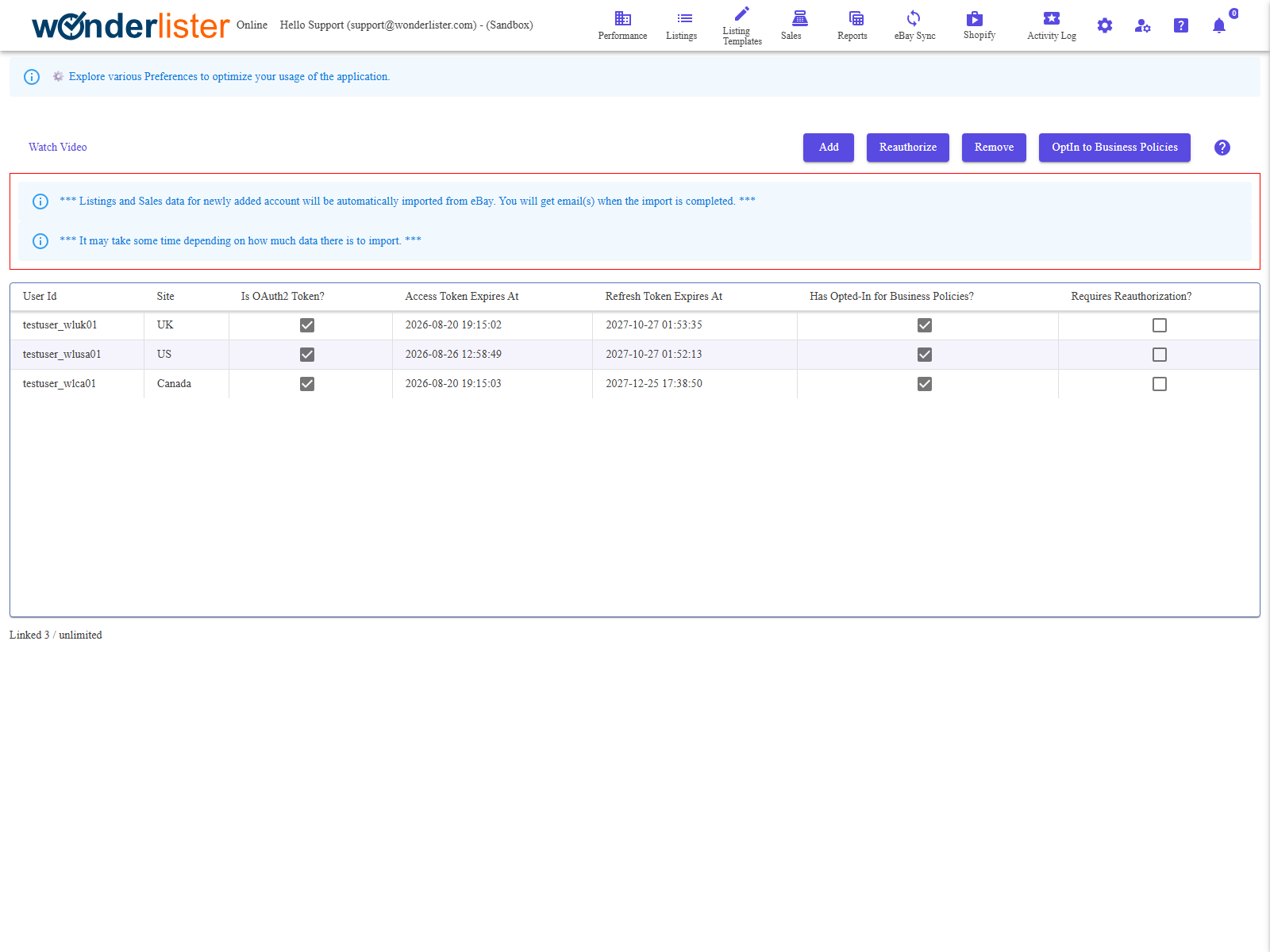
This page is where you link your eBay selling accounts to WonderLister, re-authorise them when eBay’s
permission expires, and remove them. Everything else in WonderLister — listings, sales, business policies,
the eBay sync — works through an account linked here.
that import only covers the sites you have configured on eBay Sites. Anything
left unticked there will not come across.
The toolbar
| Button | What it does |
|---|---|
| Add | Starts the link. WonderLister asks eBay for a consent page and sends you to it; you sign in to eBay and agree, and eBay sends you back. The desktop application opens the consent page in its own window; the online application navigates to it. |
| Reauthorize | The same journey, for an account already in the list. Select the row first. Use it when the Requires Reauthorization? column is ticked or a token has expired. |
| Remove | Unlinks the selected account and deletes all of that account’s data inside WonderLister. Your eBay account and its live listings are not affected. You are asked to confirm, and the confirmation names the account. |
| OptIn to Business Policies | Asks eBay to opt the selected account in to business policies. Payment, shipping and return policies do not exist for an account that has not opted in. |
| Watch Video | Opens the tutorial video for this page. |
The columns
| Column | What it shows |
|---|---|
| User Id | The eBay user id of the linked account. |
| Site | The account’s home marketplace. |
| Is OAuth2 Token? | Whether the link uses eBay’s current OAuth2 permission scheme. |
| Access Token Expires At | When the short-lived token expires. WonderLister renews this for you. |
| Refresh Token Expires At | When the long-lived permission expires. This is the one that needs a manual re-authorisation, and eBay does not let it be renewed silently. |
| Has Opted-In for Business Policies? | Whether the account can use eBay business policies. |
| Requires Reauthorization? | Ticked when WonderLister can no longer act for the account. |
Dates are shown in your own local time. Column headings sort. One account is selected at a time.
What happens after you link an account
- WonderLister imports that account’s listings and sales in the background, for the sites you configured.
- You are emailed when the import finishes. A large account takes a while — the page says so.
- Until the import completes the Listings and Sales grids will be incomplete. That is expected, not a fault.
How many accounts you may link
The line under the grid states how many accounts your subscription allows, and an
Upgrade subscription button appears once you have reached it. Plans are on
Subscriptions.
Permissions
The page is drawn only for an account administrator or a staff account granted the eBay-account permission.
Staff permissions are set on Staff Accounts.
FAQ
you. Select the account and press Reauthorize; you will sign in to eBay and agree again.
Until you do, nothing WonderLister does on that account’s behalf will reach eBay.
that any browser signed in as a different eBay user is signed out first. If eBay reports an
authorisation error rather than a password error, contact support.
Your eBay account and everything live on it are untouched.
a broken link use Reauthorize rather than adding it again.
OptIn to Business Policies. Until then the
Payment, Shipping and
Return policy pages will be empty for it.
new subscription can take a minute to register. Reload the page.
Support
For further assistance you can:
- Email [email protected]
- Use the Contact Us page inside the application
← Back to the User Guide index
Or go to Support, the FAQs, or contact us.