
← All WonderLister user guides
Weights & Dimensions records the size and weight of the packed parcel — not
the item on its own. eBay uses these figures to calculate postage when the shipping policy charges
calculated rates, so getting them right is what stops you being out of pocket on postage.
Where to find it
Open a listing in the editor and scroll to Weights & Dimensions, or click it in the
editor’s left-hand section list.
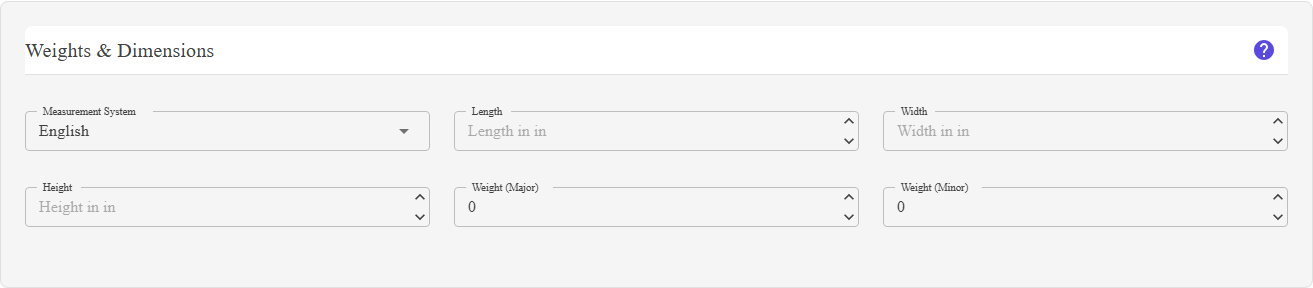
Measurement system, then length, width, height and the two weight boxes.
What is on this section
| Field | What it does |
|---|---|
| Measurement System |
English or Metric. This is the switch that decides what every other box on the section means — the placeholders change with it, to in, lb and oz for English, and cm, kg and gm for Metric. |
| Length | The parcel’s longest side, in inches or centimetres. Two decimal places, minimum zero. |
| Width | The parcel’s width, in the same unit. |
| Height | The parcel’s depth, in the same unit. |
| Weight (Major) | The whole part of the weight — pounds under English, kilograms under Metric. |
| Weight (Minor) |
The remainder — ounces under English, grams under Metric. eBay expects weight as two numbers, so a parcel of 2 lb 6 oz is entered as 2 and 6, not as 2.375. |
The section can be hidden. There are two separate options in the editor part of
Preferences — Hide weight and Hide dimensions. The dimension boxes
disappear with the first, the weight boxes with the second, and the whole section only vanishes from the
editor when both are on.
Preferences — Hide weight and Hide dimensions. The dimension boxes
disappear with the first, the weight boxes with the second, and the whole section only vanishes from the
editor when both are on.
How to use it
- Choose the measurement system your figures are in.
- Measure the packed parcel — the box with the item inside it and the padding around
it, not the bare item. - Enter length, width and height.
- Enter the weight as two numbers: whole units in Weight (Major), the
remainder in Weight (Minor). - Round up rather than down. Carriers charge on what they measure, not on what you
hoped.
FAQ
Q: Do I have to fill these in?
A: Only if the shipping policy uses calculated postage, which needs them to work
out a price. Flat-rate postage does not.
out a price. Flat-rate postage does not.
Q: What are Major and Minor weight?
A: The two halves of a weight in eBay’s format. Under English, Major is pounds and
Minor is ounces; under Metric, Major is kilograms and Minor is grams.
Minor is ounces; under Metric, Major is kilograms and Minor is grams.
Q: I switched from English to Metric — were my numbers converted?
A: No. The switch changes what the numbers mean, not the numbers
themselves. Re-enter them in the new units.
themselves. Re-enter them in the new units.
Q: Part of the section is missing.
A: Hide weight or Hide dimensions is on in your editor
Preferences. Each hides its own half.
Preferences. Each hides its own half.
Q: Should I measure the item or the box?
A: The box, as it will be posted. That is what the carrier charges for.
Support
For further assistance you can:
- Email [email protected]
- Use the Contact Us page inside the application
← Back to the User Guide index
Or go to Support, the FAQs, or contact us.