
← All WonderLister user guides
Main details is the heart of the listing editor: the title buyers search on, the
description they read, and the internal bookkeeping — SKU, lot size, unit cost, folder and consignor —
that WonderLister keeps against the item.
Where to find it
Open a listing in the editor and scroll to Main details, or click it in the editor’s
left-hand section list. It is the second section, directly below Account & Site.
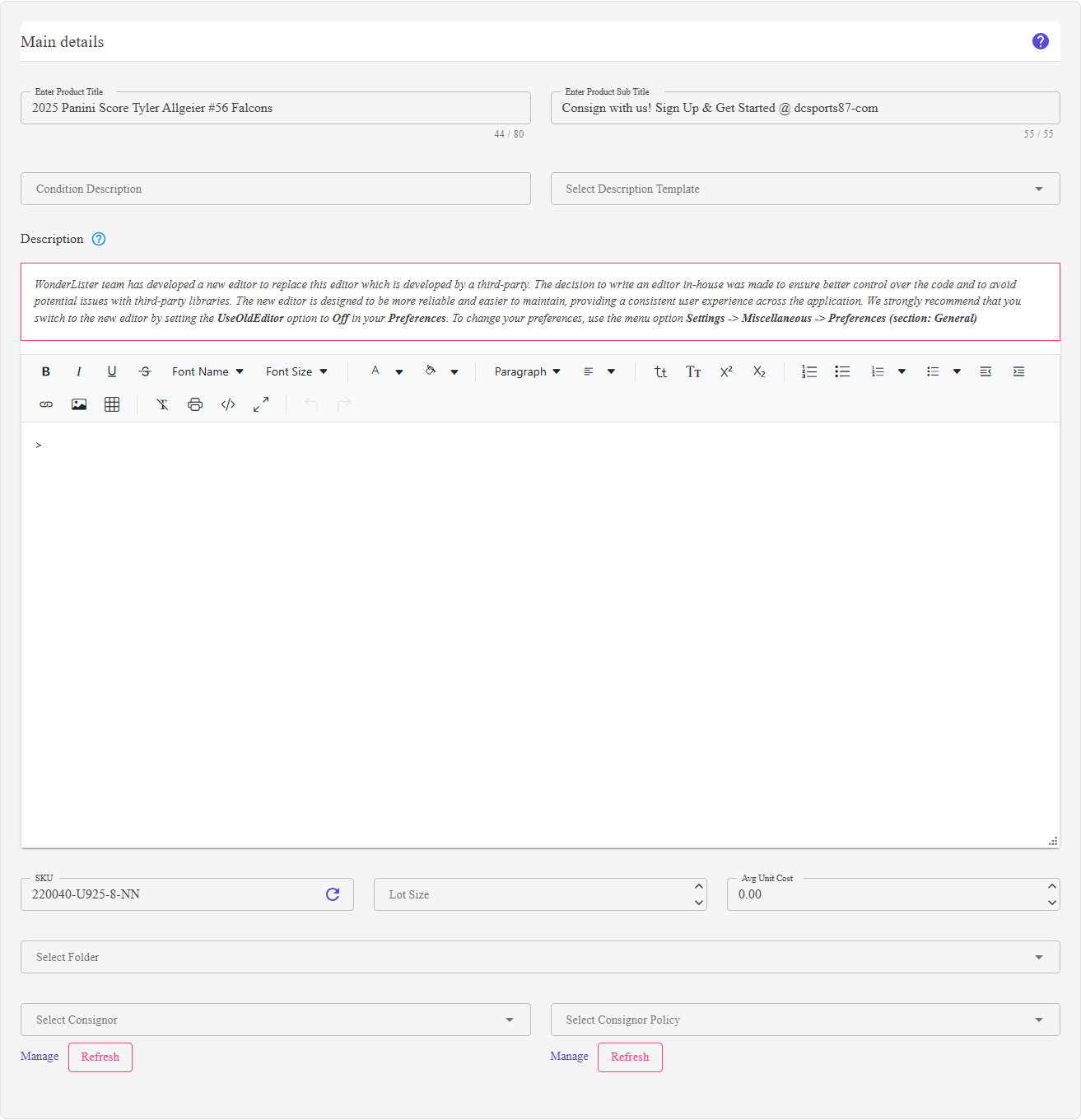
Main details: title and sub title, condition description, description template, the description editor, then SKU, lot size, unit cost, folder and consignor.
What is on this section
| Control | What it does |
|---|---|
| Enter Product Title |
The listing’s title. A character counter sits under the box and the field will not accept more than the maximum — both come from the maximum characters for title setting in your editor Preferences, so you can hold yourself to a shorter limit than eBay’s. |
| Enter Product Sub Title |
eBay’s optional subtitle, shown under the title in search results. eBay charges a fee for it. Has its own maximum and counter, also from Preferences. Hidden if Hide sub title is on. |
| Condition Description |
A free-text note on the item’s condition — wear, faults, what is missing. Distinct from the condition itself, which is an item specific. Hidden if Hide condition description is on. |
| Select Description Template |
Applies one of your saved description templates to the listing, so every item shares a layout. Hidden if Hide description template is on. |
| Description |
The rich text editor for the listing body — the HTML eBay shows on the item page. The help icon beside the heading explains the field. The editor grows to 600 pixels tall before it scrolls. |
| SKU |
Your own stock-keeping code. The refresh icon at the right-hand end of the box generates a SKU for you. Hidden if Hide SKU is on. |
| Lot Size | How many units make up one sale, for items sold in lots. Whole numbers, minimum zero. Hidden if Hide lot size is on. |
| Avg Unit Cost | What one unit cost you, to two decimal places, minimum zero. Used by the profit figures in reports. Never sent to eBay. Hidden if Hide average unit cost is on. |
| Select Folder |
The WonderLister folder the listing is filed in. Only the deepest folders — those with no subfolders of their own — can be chosen, because a listing lives in a leaf. |
| Select Consignor / Select Consignor Policy |
Who the item is being sold on behalf of, and on what commission terms. Both are hidden if Hide consignor is on. See Consignors. |
Most of this section can be turned off. Sub title, condition description, description
template, SKU, lot size, average unit cost and the consignor fields each have their own Hide…
option in the editor section of Preferences. If a field described here is not on your
screen, that is where it went.
template, SKU, lot size, average unit cost and the consignor fields each have their own Hide…
option in the editor section of Preferences. If a field described here is not on your
screen, that is where it went.
How to use it
- Write the title. This is what eBay’s search matches on, so put the words a buyer
would type in it. Watch the counter. - Add a sub title if it is worth eBay’s fee.
- Describe the condition honestly in Condition Description.
- Pick a description template if you use one, then write the item-specific part of the
description in the editor below. - Set the SKU — type your own, or press the refresh icon to have one generated.
- Fill in lot size and unit cost if you track them.
- File the listing in a folder, and set the consignor if the item is not yours.
FAQ
Q: The title box stops accepting characters before eBay’s limit.
A: The limit is yours, not eBay’s — it is the maximum characters for title
setting in your editor Preferences. Raise it there.
setting in your editor Preferences. Raise it there.
Q: Half the fields described here are missing.
A: Each has a Hide… option in the editor section of
Preferences. Turn the ones you want back on.
Preferences. Turn the ones you want back on.
Q: What does the circular arrow inside the SKU box do?
A: It generates a SKU for the listing. It replaces whatever is in the box.
Q: The description editor looks different from the one I remember.
A: There are two. WonderLister’s own editor is the current one; the older
third-party editor is still available, and which you get is the UseOldEditor option
under Settings → Miscellaneous → Preferences (section: General). The old
editor shows a banner recommending the switch.
third-party editor is still available, and which you get is the UseOldEditor option
under Settings → Miscellaneous → Preferences (section: General). The old
editor shows a banner recommending the switch.
Q: Why can I only choose some folders?
A: The picker offers leaf folders only — folders with no subfolders. A listing is
filed in a specific folder rather than in a branch of the tree.
filed in a specific folder rather than in a branch of the tree.
Q: Is Avg Unit Cost sent to eBay?
A: No. It is yours, and it is what the profit columns in reports are calculated
from.
from.
Support
For further assistance you can:
- Email [email protected]
- Use the Contact Us page inside the application
← Back to the User Guide index
Or go to Support, the FAQs, or contact us.