
WonderLister Desktop · Windows 10 & 11
eBay listing software for Windows
Your whole catalogue on your own machine, where a bulk edit across thousands of rows happens at the speed of your PC and not your connection. Built for the sellers with the most listings.
15-day free trial, full access, unlimited listings. No charge for 15 days, cancel any time before it ends.
the installed application
your catalogue and your data, locally
data retention — sales history never expires
from download to your first listing
Why the desktop app
Three reasons people choose Desktop
Same eBay depth as Online. The difference is where the work happens — and on a very large catalogue, that difference is felt.
Speed that does not depend on your connection
The catalogue is a database on your own disk. Sorting forty thousand rows, filtering them and applying a bulk edit all happen locally — nothing round-trips to a server first.
Your data stays with you
Your listings, costs, private fields and sales history live on your machine. Backups run automatically, as often as you like, to a folder you choose.
Built for the biggest catalogues
This is the edition high-volume sellers reach for. If nothing else has coped with the number of listings you run, this is the one to try first.
What it does
Depth eBay’s own tools don’t reach
WonderLister is eBay-only on purpose. Every hour of development goes into one marketplace instead of six, which is why the editing goes this far down.
Bulk listing & editing
Create hundreds of listings from one grid. Edit almost every field in bulk — including fields eBay will not let you change in bulk at all. Mass-update descriptions across the whole catalogue in one pass.
Accounts & sites
One sign-in for every eBay account you run. Copy listings from one account to another, then bulk-edit the copies. List on 25+ international sites without a second tool.
Automation & scheduling
Relist and auto-list rules, scheduling around eBay’s no-insertion-fee promotions, automated buyer feedback, and cost-per-click campaign automation.
Inventory & organisation
Custom folders and saved searches, private custom fields only you can see, grid views you define column by column, and a user interface you can strip back to what you actually use.
Orders, profit & reporting
Profit and loss per sale, pick lists, combined orders from one buyer, shipment tracking, printed invoices you design, and consignor payouts with commission tracking.
Compliance & specifics
GPSR product-safety data and responsible persons, item specifics, auto-parts compatibility and fitments, multi-variation listings, and product identifiers.
The actual software
A grid, not a wizard
Everything is a table you can sort, filter, save as a view and edit in place — because that is how you work when there are forty thousand listings.
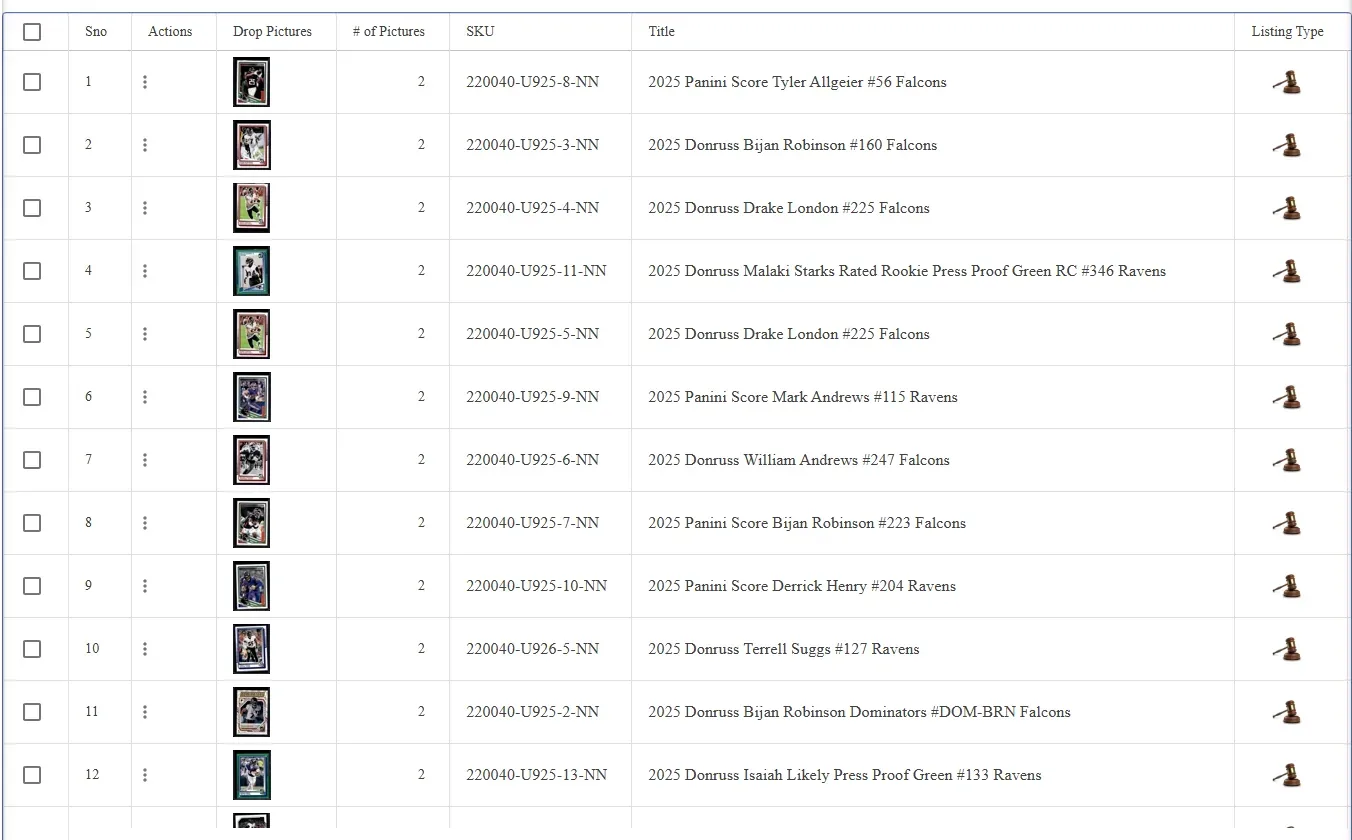
The All Listings grid. Columns, their order and their widths are yours to define and save as a named layout. See every screen documented →
Switching
Coming from another tool?
Import from CSV or Excel, including exports from Turbo Lister and InkFrog. Active eBay listings come across on their own, ended listings rebuild from the file, and externally hosted images are copied onto our servers.
listings migrated in under three hours by one seller
In their words
Sellers who moved, and stayed
“We are just killing it with WonderLister. The software is moving mountains for us. Our revenue is up 200% in the last 60 days and there is no end in sight.”
Jay · eBay seller
“The WonderLister tool is really fast, because it is architected really well. And as opposed to some other tools, it is really simple to set up a listing. The other good thing is, you only pay for what you use.”
Sal Militello · eBay seller
“I am a power seller on eBay and had tried every listing tool out there. Nothing could deal with the volume of sales that I have to manage. Then I came to WonderLister. It is the only desktop listing program that could handle my listings and all my content.”
Sandy · eBay power seller
“I would like to thank you for your second-to-none excellent customer service. Your phone calls and immediate response to my email have won me over as a loyal customer.”
Melody · eBay seller
Pricing
Six plans. Pick the one that fits your volume.
Billed monthly or yearly, on either edition. Every plan starts with the same 15-day free trial.
Beginner
per month
Bronze
per month
Silver
per month
Gold
per month
Platinum
per month
Diamond
per month
Prices can change at any time and are effective immediately. Desktop plans in full → Online plans in full →
Questions
Questions about Desktop
Which versions of Windows does it run on?
Windows 10 and Windows 11. There is no Mac build — if you are on a Mac, use WonderLister Online, which runs in any browser and does the same job.
Where is my data kept?
In a database on your own machine. Automatic backups run as often as you choose, to a folder you choose, so a failed disk does not cost you your sales history.
How is it different from WonderLister Online?
The same eBay depth in both. Desktop keeps the catalogue locally and is the fastest option on very large inventories; Online keeps it on our servers so a team can work from anywhere on any device. You can start with either.
Can I bring my existing listings across?
Yes. Active eBay listings import automatically. Anything else comes in from a CSV or Excel file, including the exports produced by Turbo Lister and InkFrog. Images hosted somewhere else are copied to our servers as part of the import.
What is included in the free trial?
Fifteen days of full access with unlimited listings. The one limit is that bulk operations are capped at 25 items per operation during the trial. Setting up a subscription is required to begin, but you are not charged for the first 15 days and can cancel any time before the trial ends.
Download it and list something today
Fifteen days, full access, no charge. Set up takes under ten minutes, and your active eBay listings import on their own.